
Networking is awkward. Your card shouldn’t be.
A free trading card maker that runs in your browser: your portrait on the front, your best attacks, a holofoil finish, and a QR code to your site on the back.
The business card people actually keep.
Business cards go straight in the drawer. Everyone’s looks the same: a white rectangle, a name, a title that explains nothing about what the person is actually great at, and three ways to reach them that nobody will use. By the end of the night it’s a stack, and nobody remembers which one was you.
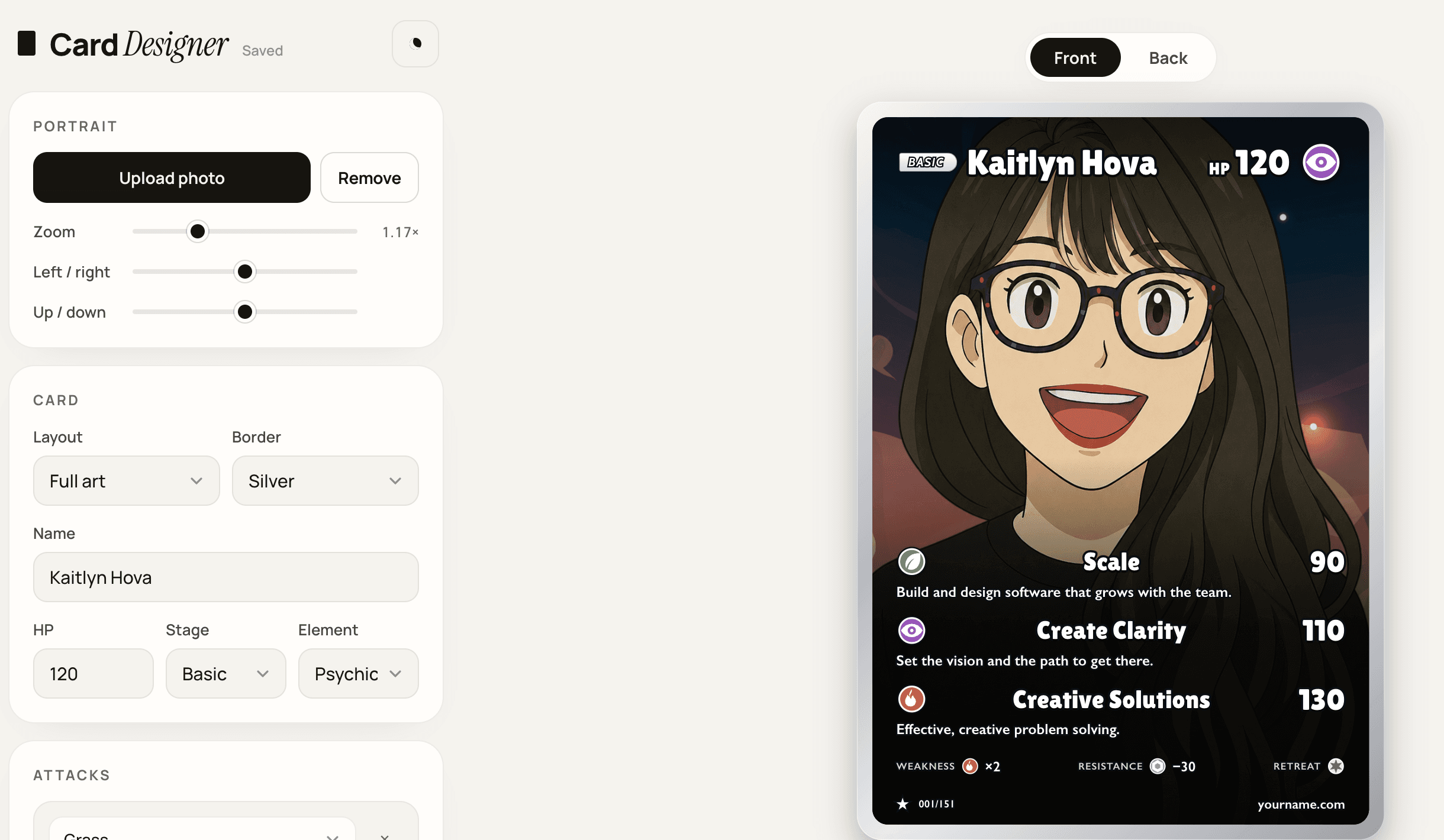
Card Designer is a Hova Labs internal project that swaps the rectangle for a holofoil trading card of you. Drop in a portrait, give yourself HP and an element, write up to three attacks, and put a QR code to your site on the back. Pick a foil, download print-ready PNGs, and hand out the one card that stays on the desk. It is free, needs no account, and your photo never leaves your browser.
Visit Card Designer →Everything a business card has. Plus HP.
The card follows the anatomy people already know from the binders of their childhood. A portrait fills the frame, either full art or a classic framed window. Across the top sit a stage badge, your name, your HP, and an element icon from twelve energy types. Below the art come up to three attacks, each with an energy icon, a name, a damage number, and a line of effect text, which is where a job title gets replaced by what you are actually great at.
The bottom strip carries weakness, resistance, and retreat cost, because of course it does, then a rarity symbol, a set number such as 001/151, and a footer line for your URL. An optional info strip under the photo holds the flavor text: number, job, height, weight. Flip the card and the back has arched text and a QR code drawn right into the art. That is the business-card part, and yes, it still scans.
 Front
Front Back
BackSelfie to holofoil in about five minutes.
The editor is one page: a panel of fields on the left and the live card on the right, with a Front and Back toggle above it. Every field on the card is yours to change, and there is nothing to learn beyond that. Drag the photo on the card to reposition it, or use the zoom and offset sliders if you would rather be precise.
Attacks are the part you will overthink and the part people will actually read, so they get the most room: an energy type, a name, a damage number, and a line of effect text each, up to three. The card saves itself in your browser as you type, so closing the tab and coming back a week later picks up right where you left off.
Free, no account, and nothing uploads.
The whole app is plain HTML, CSS, and JavaScript served as static files, with no backend. Your portrait is read into the page as a data URL and stays there; the card is ordinary DOM, and html-to-image rasterizes that DOM inside the browser when you export. There is no upload and no account because there is nowhere for your photo to go.
Every edit is written to localStorage, with a fallback that keeps the text when a photo is too large to store. The QR code comes from qrcode-generator at the highest error-correction level, so it survives the foil and the print, and the editor warns when a URL is too long to encode. The holofoil effect is ported from the open-source pokemon-cards-css layers: a spring follows the pointer and drives the tilt, glare, and shine through CSS variables, previewed on hover and left out of the download.
Sized for the print shop, or the printer at home.
Download PNG gives you the front and the back at 750 × 1050 pixels, the size the card is designed at. Download for printer adds 36 pixels of bleed on every side for 822 × 1122, the poker-card spec MakePlayingCards asks for at 300 dpi; the card’s own edge pixels are stretched outward to fill the bleed and the corners are squared, so the cutter has something to trim.
Print / PDF hands the card to the browser’s print dialog at 2.5 by 3.5 inches, standard poker size, so a home printer and a pair of scissors work too. Whichever route you take, the holofoil stays on screen: it is a hover effect, not part of the file, so the print is crisp and the foil is whatever stock you choose to print on.
Let’s build something big.
Tell us about your engineering goals. We’ll tell you how we’d get there.
Get in touch