
A second brain for your household.
Every contractor, paint color, policy, and routine in one private place, with an assistant that answers questions about them.
The details you’d forget, remembered.
Running a household generates a thousand small facts: which plumber replaced the sump pump, what paint is on the laundry room walls, when the water filter was last changed, which app controls the doorbell camera. They end up scattered across texts, receipts, photos, and memory, and the one you need is never where you look.
Hovabrain started as an internal project to keep all of it in one private place. It organizes a household into 13 areas, from Reminders and Calendar to House, Pets, Medical, Vehicles, Finances, and Insurance. Every area holds structured records you can add, edit, and delete, and a prompt on the home screen lets you simply ask: who recaulked the backsplash, or what finish is on the bedroom trim.
Visit Hovabrain →Don’t browse. Just ask.
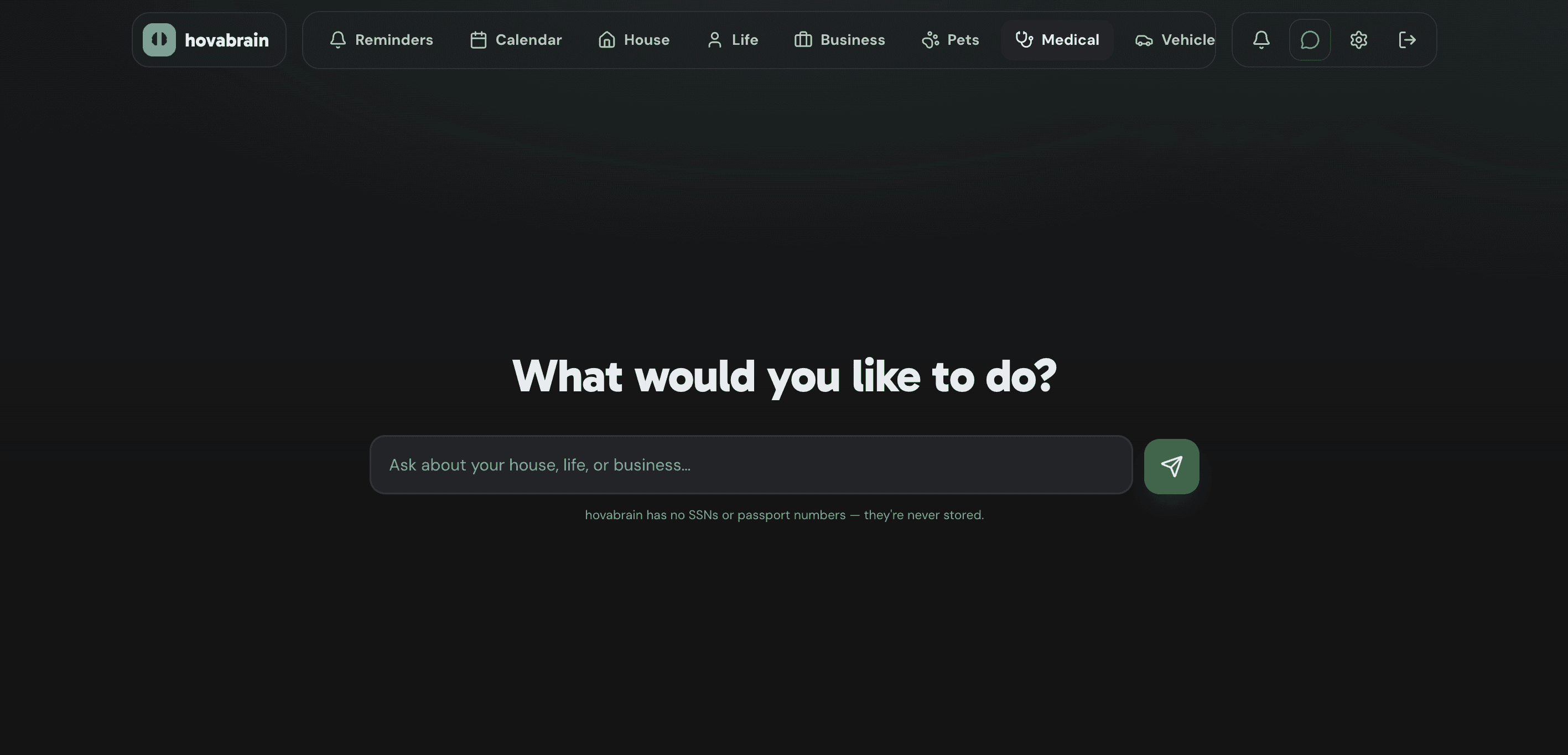
The home screen is a single question, “What would you like to do?”, above a prompt that invites you to ask about your house, life, or business. The assistant answers from the household’s own records, so it can tell you which electrician moved the wire in the main bedroom, what finish the guest bathroom paint is, or when the solar panels were last washed.
The same assistant is one tap away from every page through a chat button in the navigation, next to notifications, settings, and sign out. A note under the prompt sets the boundary up front: Hovabrain has no Social Security or passport numbers, because they are never stored.
Which paint is on the laundry room walls?
Behr, matte finish. The can photo and a where-to-buy link are saved under House › Paint › Laundry Room.
hovabrain has no SSNs or passport numbers — they’re never stored.
Thirteen areas, one pattern.
The navigation is a single row of areas, each with an icon: Reminders, Calendar, House, Life, Business, Pets, Medical, Vehicles, Travel, Music, Finances, Insurance, and Dependent Care FSA. The row scrolls sideways, so a new area is a new entry rather than a redesign, and each area opens with a one-line summary of what it holds.
Inside an area, pill tabs split it into collections. House alone covers Plants, Rainbow Garden, Contractors, Paint, Flooring, Tiling, Service, Routines, Mortgage, Utilities, and Smart Home Apps. Every collection follows the same layout: a heading with a count, an Add button in the corner, and a card per record with edit and delete controls, so once you have learned one page you have learned them all.
Shaped for the question you’ll ask in two years.
Each record is built around how it gets used later. A contractor card holds the trade as a colored tag, a phone number, an email, a link to their Yelp page, free-form notes, and a dated log of past jobs, so “who fixed the breaker, and when?” is a glance. Paint is grouped by room, and every entry pairs a photo of the actual can with the surface it covers, the color name, the brand and finish, and a where-to-buy link.
Flooring records the material, which rooms it was laid in, where the spare boxes are stored, and the product page. Tile is grouped by room like paint, with the vendor, the tile type, a where-to-reorder link, and notes on where it went. Each card type gets exactly the fields that matter for it and nothing else, which keeps adding a record quick enough that it actually happens.
Maintenance that keeps its own calendar.
Service reminders and routines are the same idea at two speeds: the yearly HVAC and tankless water heater checkup or the under-sink water filter every five years on one side, clean the floors, wash the solar panels, and clean the bathrooms every month on the other. Each card shows the interval, the next due date, the last time it was done, and a countdown pill such as “In 3 weeks” or “In 8 months”. One tap on Mark done today stamps the record and rolls the next date forward, a service reminder can link to the contractor who does the work or to the replacement part, and a bell in the navigation holds notifications.
Plants get the same schedule with none of the typing. Add one by taking its picture: Hovabrain sends the photo to a plant-identification API, which returns the species and how often it wants water, and that becomes the plant’s watering interval. From then on, Hovabrain reminds you to water it on that schedule, right alongside the routines and service checkups. The photo does one more job: the app generates a representative SVG of the plant from it, so each plant’s card carries a clean illustration that matches the real thing.
Links to secrets, never the secrets.
Mortgage, utilities, and smart home apps are where a household’s logins live, and Hovabrain refuses to hold them. A mortgage card stores the lender, a loan number, a photo of the house, and notes such as which phone receives the two-factor code. Utility providers carry a color-coded category for trash, electricity, or water, a phone number, and a Visit website link. Smart home apps get an initial avatar, an App Store link, and a plain description of what the app controls, from smart outlets to the doorbell camera to remote water shutoff.
Every one of those cards has a See on 1Password button that opens the real entry in the password manager, and a banner at the top of the page says so in one line: only the lender and a link to your 1Password entry are stored, never the password itself. The same rule covers identity. There is no field for a Social Security or passport number anywhere in the app.
Let’s build something big.
Tell us about your engineering goals. We’ll tell you how we’d get there.
Get in touch